

Self-Updating Wails App
Build a Wails v3 application that updates itself from GitHub Releases — from `wails3 init` through signed release verification and the helper-mode swap.
In this tutorial you’ll add an in-app updater to a fresh Wails v3 application. By the end, the app will:
- Check GitHub Releases on demand (and optionally on a timer).
- Download the right asset for the running OS + architecture.
- Verify a SHA-256 digest (and optionally an Ed25519 signature) against the bytes it downloaded.
- Show release notes in the framework’s default update window.
- Swap the running binary and relaunch — all without shipping a separate helper executable.
We’ll use GitHub Releases as the update source because it’s free and requires no infrastructure. The same patterns work with keygen.sh and Sparkle AppCast — see the Updater guide once you finish.
Start with a fresh Wails app
Scaffold a new project with the vanilla template:
wails3 init -n updater-tutorial -t vanilla
cd updater-tutorial
You should now have a directory with main.go, frontend/, and a Taskfile.yml. Confirm it builds and launches:
wails3 task dev
A blank Wails window should open. Quit and continue.
Add the updater import
Open main.go and add the two updater packages to your imports:
package main

import (
    _ "embed"

    "github.com/wailsapp/wails/v3/pkg/application"
    "github.com/wailsapp/wails/v3/pkg/updater"
    "github.com/wailsapp/wails/v3/pkg/updater/providers/github"
)
These pull in the Updater itself and the GitHub Releases provider.
Configure the Updater
app.Updater is already wired into every *application.App — you just need to call Init:
const currentVersion = "1.0.0"

gh, err := github.New(github.Config{
    Repository:    "yourorg/your-repo",   // ← change this
    ChecksumAsset: "SHA256SUMS",          // sibling file with sha256 digests
})
if err != nil {
    log.Fatalf("github.New: %v", err)
}

if err := app.Updater.Init(updater.Config{
    CurrentVersion: currentVersion,
    Providers:      []updater.Provider{gh},
}); err != nil {
    log.Fatalf("Updater.Init: %v", err)
}
Place this after application.New and before app.Run().
Add a menu item that triggers the update
In the same main.go, add a “Check for Updates…” menu entry:
menu := app.Menu.New()
app.Menu.SetApplicationMenu(menu)
appMenu := menu.AddSubmenu("App")
appMenu.Add("Check for Updates…").OnClick(func(*application.Context) {
    go func() {
        if err := app.Updater.CheckAndInstall(context.Background()); err != nil {
            app.Logger.Error("update", "error", err)
        }
    }()
})
CheckAndInstall opens the framework’s update window, runs Check, and if a release is found, runs DownloadAndInstall automatically. The window stays open in the “Up to Date” state when there’s nothing new — the user dismisses it with the Close button.
Run it once with no releases
wails3 task dev
Click App → Check for Updates…. You should see the update window open briefly, hit the GitHub API, find no releases newer than 1.0.0, and settle on the Up to Date state with a green ✓.
If you get an error here, it’s usually one of:
| Symptom | Fix |
|---|---|
404 Not Found |
The Repository field is wrong — must be owner/repo |
403 rate-limited |
Add Token: "ghp_…" to the github.Config (use a PAT with public_repo scope) |
| Network errors | Confirm the running app can reach api.github.com |
Publish a test release
Bump currentVersion in main.go to 1.0.0 (or leave it). Build for one platform to get a binary you can attach to a release:
wails3 task build:darwin
# produces bin/updater-tutorial.app
# zip it for the release asset:
cd bin && zip -r updater-tutorial-darwin-arm64.zip updater-tutorial.app && cd ..
wails3 task build:linux
# produces bin/updater-tutorial
mv bin/updater-tutorial bin/updater-tutorial-linux-amd64
wails3 task build:windows
# produces bin/updater-tutorial.exe
mv bin/updater-tutorial.exe bin/updater-tutorial-windows-amd64.exe
Generate a SHA256SUMS file alongside the binary:
cd bin
shasum -a 256 updater-tutorial-* > SHA256SUMS
cat SHA256SUMS
You should see one or more lines like:
abc123… updater-tutorial-darwin-arm64.zipNow publish this as v2.0.0 on your GitHub repository:
gh release create v2.0.0 \
    --title "v2.0.0" \
    --notes "First update for the self-update tutorial.

- **Bold** Markdown renders in the update window
- \`Code spans\` too
- Lists work
- GFM tables work" \
    bin/SHA256SUMS bin/updater-tutorial-*
Run the app and verify the update
With currentVersion still 1.0.0, run the app again:
wails3 task dev
Click App → Check for Updates…. This time you should see something like:
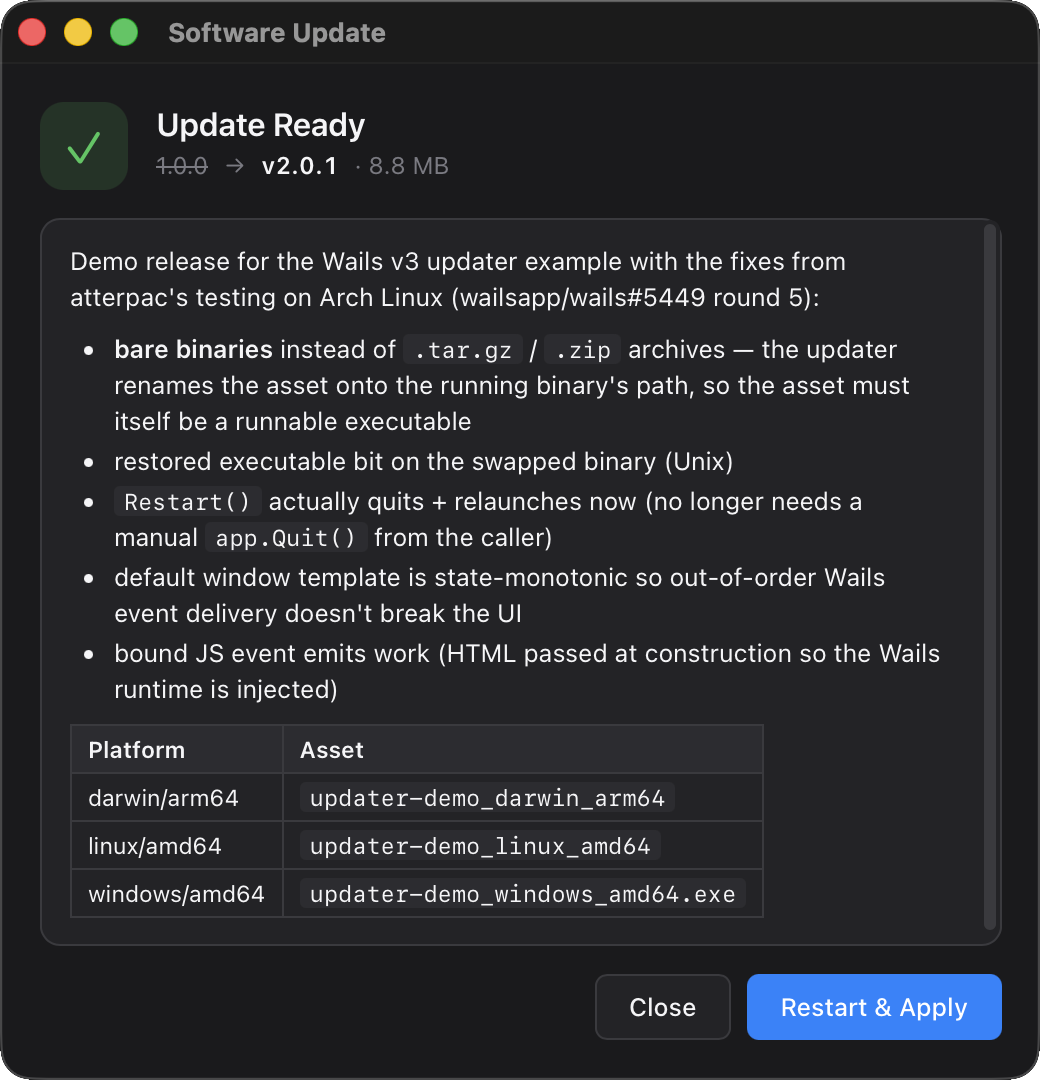
- Hero icon flips from blue ↓ (“Update Available”) to green ✓ (“Update Ready”).
- Subtitle shows
v1.0.0 → v2.0.0 · <size>. - Release notes panel renders your Markdown with bold, code spans, and the table.
- Progress bar fills during download (it’ll be quick — the binary is small).
The Updater stages the new binary in a temp directory. To complete the update:
- Click Restart & Apply.
- Your app exits, the helper swaps the binary, the new binary relaunches.
- The relaunched app reports
currentVersion = "1.0.0"(because we hardcoded it), but the bytes on disk match the v2.0.0 build.
In a real app, currentVersion would be set at build time via -ldflags so the new binary knows it’s now v2.0.0 and a subsequent check finds no update.
Wire `currentVersion` to the build
Replace the constant with a build-time variable:
var (
    currentVersion = "dev" // overridden by -ldflags at release time
)
Then in your build command:
wails3 task build:darwin -- -ldflags "-X main.currentVersion=2.0.0"
Or add the -ldflags to your Taskfile.yml so it picks up from git describe --tags.
Add cryptographic signing (recommended for production)
The SHA256SUMS path verifies integrity (the bytes match what GitHub stored) but not authenticity (those bytes were produced by your release pipeline, not a compromised maintainer account). For tamper-resistance, sign each release with an Ed25519 key:
# One-time: generate the keypair
ssh-keygen -t ed25519 -f updater-key -N "" -C "wails-updater"
#   updater-key      — keep secret (build server, HSM, password manager)
#   updater-key.pub  — bundle in your app
For each release, sign the SHA-256 digest of each asset with your private key. A small Go helper:
package main

import (
    "crypto/ed25519"
    "crypto/sha256"
    "encoding/base64"
    "fmt"
    "io"
    "os"
)

func main() {
    priv, _ := os.ReadFile("updater-key")
    key := ed25519.PrivateKey(priv) // raw 64-byte private key

    f, _ := os.Open(os.Args[1])
    defer f.Close()
    h := sha256.New()
    _, _ = io.Copy(h, f)
    sig := ed25519.Sign(key, h.Sum(nil))
    fmt.Println(base64.StdEncoding.EncodeToString(sig))
}
The default GitHub provider doesn’t currently fetch a separate signature file — you can write a custom provider that does, or switch to keygen.sh which signs every artifact server-side and exposes both the digest and signature via its API.
Embed the public key in your app:
//go:embed updater-key.pub
var updaterPublicKey []byte

app.Updater.Init(updater.Config{
    CurrentVersion: currentVersion,
    PublicKey:      updaterPublicKey,
    Providers:      []updater.Provider{gh},
})
With PublicKey set, any release that ships a Signature must verify against this key. The release source has no way to substitute its own key — that’s the whole point of pinning out-of-band at build time.
Customise the window
The default window covers the common case. Three escape hatches if you need more control — pick one based on how much you want to customise:
app.Updater.Init(updater.Config{
    // …
    Window: &updater.BuiltinWindow{
        CSS: `:root { --accent: #ff6f00; --radius: 16px; }`,
    },
})
See the Theme via CSS variables section for the full variable list.
//go:embed updater-window.html
var updaterHTML string

app.Updater.Init(updater.Config{
    // …
    Window: &updater.BuiltinWindow{HTML: updaterHTML},
})
Your HTML must subscribe to updater:* events and emit updater:user:* actions via the Wails event channel. See Replace the template for the JS shim.
myWin := app.Window.NewWithOptions(application.WebviewWindowOptions{
    Title:                "My App Updater",
    Width:                520, Height: 460,
    HTML:                 updaterHTML,
    AllowSimpleEventEmit: true,  // required — see security note
})
app.Updater.Init(updater.Config{
    // …
    Window: updater.BYOWindow(myWin.AsUpdaterWindow()),
})
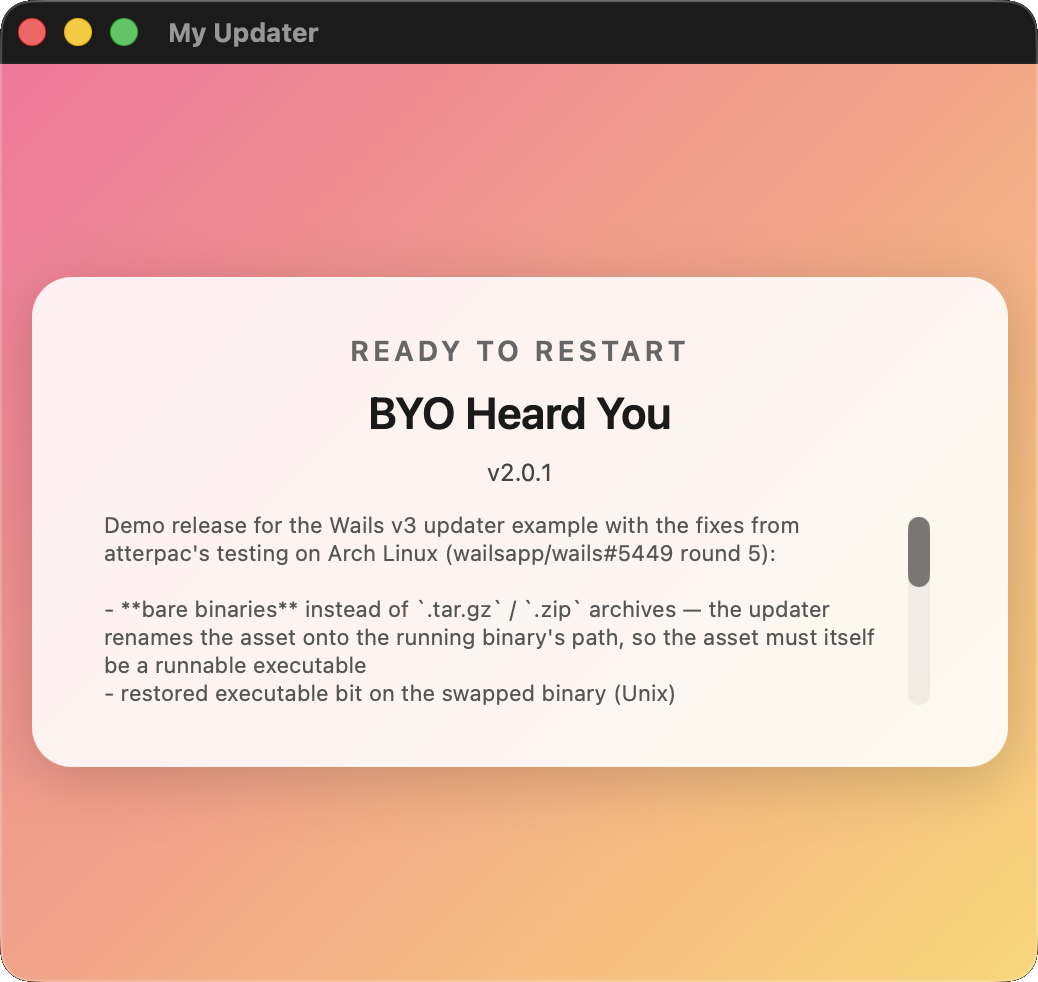
Useful when you already have your own window infrastructure and want the updater to drive it instead of opening another window. A completely custom HTML template — driven by the same updater events as the default — looks like this:
Run automatic checks in the background
To check on a timer instead of (or in addition to) the menu click:
app.Updater.Init(updater.Config{
    CurrentVersion: currentVersion,
    Providers:      []updater.Provider{gh},
    PublicKey:      updaterPublicKey,
    CheckInterval:  6 * time.Hour,
})
Each tick runs the same CheckAndInstall flow as a manual click. Set Window: updater.WindowNone if you want the periodic check to be silent until something is actually found — then subscribe to EventUpdateAvailable yourself to decide what UX to show.
You’re done
You now have a Wails app that:
- Checks GitHub Releases for updates on demand and on a timer.
- Renders release notes as Markdown in a polished default window.
- Verifies downloads against a SHA-256 digest you publish.
- Optionally verifies an Ed25519 signature against a public key you embed at build time.
- Swaps the running binary in-place and relaunches automatically.
Next steps
- The Updater guide has the full API reference, every event, every config option, and the helper-mode swap mechanics.
- Look at
v3/examples/updaterfor a complete working example you can clone. - The test target repo
wailsapp/updater-demoshows the recommended release-asset layout.
Things to watch out for in production
- Code signing on macOS — Gatekeeper requires the swapped binary to be signed and notarised. Sign your
.appbundle before zipping it for the release. The updater preserves the bytes verbatim; it doesn’t re-sign anything. - Antivirus on Windows — unsigned
.exefiles downloaded from the internet can trigger SmartScreen warnings. Sign your binary with an Authenticode certificate, or accept that users on locked-down machines may need to whitelist your app. - Atomic releases — publish
SHA256SUMS(and your binaries) together, not in separate commits. The updater fetches the sidecar separately from the binary; if they drift the digest check fails closed. - Skipped versions — the default window’s “Skip This Version” button records the skip locally. If you ship a critical security update, give it a new version number so it doesn’t get auto-skipped by users who dismissed an earlier release.